Showing posts with label html. Show all posts
11 May 2012
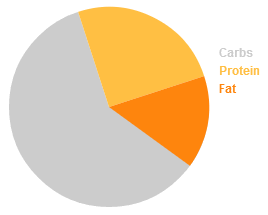
Simple Javascript Pie Chart using HTML5 Canvas tag
I had a look around today for a handy pie chart that I could quickly drop into a new web app I'm working on and it seems there's a lot of bloated solutions out there. I like to keep things short and sweet so I found this one online and edited it to make it a bit more user friendly. Enjoy!
Labels:
functions,
html,
Javascript,
js
19 July 2011
Most simple/basic single level CSS dropdown menu without Javascript tutorial
Sometimes when web demos focus on extended functionality, it's difficult to identify and extract exactly what you need for your own project from the examples. With beginners & newcomers to CSS in mind, I've put together this extremely simple dropdown menu & tutorial. You can take this skeleton and add styling and content for your own project. This menu auto sizes/auto expands to fit its content and could easily be adapted to add more levels, animation or fancy styling.
Check out the demo here
Continue Reading >
Check out the demo here
02 May 2010
Javascript: Auto-Expand a form's select box on hover/mouseover
Productivity is all about cutting down mouse clicks. With this in mind, I've written this function to open/close a html dropdown menu on mouseover/out. It's currently more of an idea than a usable function, so it might need some testing & tweaking to work cross browser in a real web environment but the basic principal is here to get you started.
Try a demo »
Continue Reading >
Try a demo »
Labels:
css,
html,
Javascript,
js,
usability
26 September 2009
Javascript ScrollFix: Remember scroll position after page reloads.
I've seen a tonne of great web apps with this annoying quirk: When you press save or OK on a settings page, it jumps back to the top as the page reloads. Even some high profile products like Gmail have this irritating usability issue. (Try merging 2 contacts at the bottom of your list and watch the list jump back to the top)
This little bit of javascript saves a cookie when the page is unloaded and attempts to read it and set the scroll position the next time the page is loaded.
Continue Reading >
This little bit of javascript saves a cookie when the page is unloaded and attempts to read it and set the scroll position the next time the page is loaded.
Labels:
cookie,
html,
Javascript,
usability
Subscribe to:
Posts (Atom)
